 |


|
#11
 09-02-2009, 06:38 PM
|
|||
|
|||
|
What is the problem??
Hey guys,
I used kalyway and iatkos v7 both but i still get the same problem. The installation was completed just fine. the computer reboots and when it gets to the grey screen with an apple logo on it it just stray there..foreverrrrrrrrr....i tried going in to single user mode.. didnt work...here's what it says: http://www.flickr.com/photos/42098931@N02/3881270107/  
|

|
#12
09-02-2009, 08:33 PM
|
|||
|
|||
|
@WAQASJEHANXEB
Please post some Hardware Info. Specially Mainboard and Chipset are important to give a statement on how to solve this. AMD Phenom II X4 955 - ASRock AM3A770DE - 8GB DDR3-1333 - Radeon HD 5570 1GB passiv - BCM4318 802.11b/g - Snow Leopard Retail
+++ AMD Phenom X3 8450 - ASRock AM2NF6G-VSTA (BIOS L2.39) - 4GB DDR2-800 - Radeon HD 4650 512MB - Snow Leopard Retail (retired) / OpenBSD
|

|
#13
09-03-2009, 07:05 AM
|
|||
|
|||
|
Okay! Thanks a lot for the response!
Dell XPS M1530 Processor: Intel Core 2 Duo 2Ghz Chipset: Intel Mobile Chipset for Dell XPS Audio: Sigmatel STAC 92XX C-Major HD Audio Network: Dell Wireless 1505 Draft WLan Mini-card Video: NVidia Geforce 8600M If you need anything else , let me know  Thanks Thanks
|
|
#14
09-04-2009, 09:27 PM
|
|||
|
|||
|
Hey..
tried using it... installed fine (excepet that in verbose mode i got SAM MULTIMEDIA READ WRITE ERROR... but the installation moved past it) but on booting back it gives the infamous STILL WAITING FOR ROOT DEVICE 1. tried everything with jumpers and cables 2. used a LOT of flags in every combination -v -f -x -s platform=x86PC platform=ACPI rd=diskXsY (with all values of X & Y) rd=diskX idehalt=0 don't know how to fix it.. PLEASEEEEE HELP MOBO: Asus P5N-MX (GeForce 7050/ nForce 610i); CPU : CELERON D 3.0GHz (SSE3); Samsung PATA DVD-RW ; Hard drive: 160G IDE Seagate Video : Onboard 128 M; RAM : 2G
|
|
#15
09-04-2009, 10:27 PM
|
||||
|
||||
|
Not working yet
Currently iATKOS v7 isn't working on my pc yet
working out how to make to work on my pc need help plz My spec: AMD Athlon(tm) 64 X2 3600+ ATI SB600 Chipest 3 GB RAM 40 GB IDE [windows xp] 500 GB SATA -210 GB [MAC] -110 GB [Vista] -80 GB [Shared] Geforce 8400 SE 512MB Realtek HD Audio Realtek RTL8101E Lan
|

|
#16
09-06-2009, 06:05 AM
|
|||
|
|||
|
Quote:
FiNALLLLLy I got past the ERROR....  as you Said... I played with the IDE/SATA drivers in the iATKos v7 customization & Selected INTEL SATA/IDE driver....  And lo! it went past the "still waiting for Root device" But then the boot stopped at a blank BLACK SCREEN... GoDDD Damn.... I booted with -V flag... also tried -x (safe mode) but it never reaches anywhere. Any ideas. please... P.S.: I tried to delete NVIDIA drivers but I cannot even reach the -s mode. Black screen Everywhere. MOBO: Asus P5N-MX (GeForce 7050/ nForce 610i); CPU : CELERON D 3.0GHz (SSE3); Samsung PATA DVD-RW ; Hard drive: 160G IDE Seagate Video : Onboard 128 M; RAM : 2G
|

|
#17
09-06-2009, 09:22 PM
|
|||
|
|||
|
iATKOS v7
Hello all,
Here is what I have done so far... burned the image using magic iso success first time.. I was surprised. tried installing on an 80g sata drive which has been formatted and ergo is empty ASUS M2A-VM mobo AMD Athlon(tm) 64 X2 Dual Core Processor 4600+ Cpu Socket Socket AM2 (940) 4gb - 2x2gb ddr2 ram 667mhz 80gb sata for the installation I recently bought the 4gb kit to make sure that the system could handle it, and i have posted my system on other forums to get advice no luck so far, but it seems that my system is running a little slower and now wacky than b4. I also think that the mobo is not capable. Any how i tried installing it and all i got was the apple logo screen with a continuous timer and a no entry sign. I tried something else, don't really know what I did but it got to the point of being stuck on finding a root system device. Anyhelp will be great, as I am sick of windows and microsoft and I am a poor student who is saving up for a mac! Until that happens I wanna try this.
|
|
#18
09-06-2009, 11:59 PM
|
|||
|
|||
|
Waiting for root device
Can please somebody recommend me exactly what to select in the Iaktos V7 CUSTOMIZE?
I can't figure it out, tryined so many things and goggled in vain. I tryied iDeneb and Iaktos v7. I get the same thing (waiting for root device): 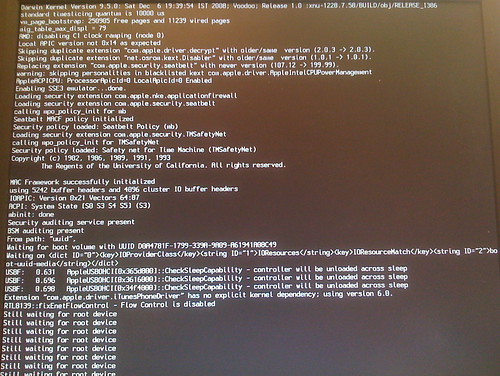 My specs: CPU : AMD Athlon™ 64 3200+ Processor (512KB L2 cache, 2.2GHz, 1600MHz FSB) Chipset : ATI RS480 Memory : 1GB DDR (400MHz) Expandable to 2GB Hard Drive : 160GB Optical Drive : 16x DVD±RW multi-format double layer Media Reader : 8-in-1 digital media manager Secure Digital™ (SD), Smart Media, Compact Flash, Micro Drive, Memory Stick®, Memory Stick PRO, Multimedia Card, USB 2.0 Video : ATI Radeon™® Xpress 200 (PCI-Express® ) 128MB DDR shared video memory Sound : AC '97 audio, Dolby 5.1 (6-channel) Network : 10/100Mbps Integrated Ethernet LAN Modem : 56K ITU V.92-ready Fax/Modem Peripherals : Standard multimedia keyboard, 2-Button wheel mouse, amplified stereo speakers Ports/Other : 7 USB 2.0 (2 in front; 4 in back; 1 in Media Reader), 1 IEEE 1394 port (in back), 1 VGA external connector, 1 Parallel, 2 PS/2 (keyboard and mouse) For VIDEO I'm using: PCIe Ati X1300 256 video card 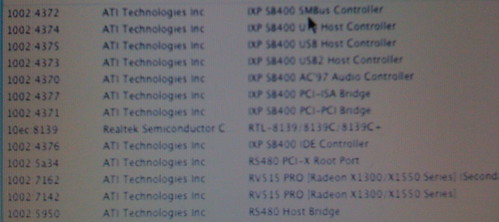 Other details I read from the motherboard: Emachines T6410 RS480M ATI XP400 SB400 MS-7145b0506017334 Thank you in advance. Last edited by georgeanton; 09-07-2009 at 12:11 AM.
|
|
#19
09-07-2009, 09:23 AM
|
|||
|
|||
|
final cut pro install failed!
hai..everyone.!!
iAtkos v7 10.5.7 run smoothly in may pc. but i had problem with Final cut pro. can't install. when i open install and run it. there a big noticed. Install Failed! "The installer could not locate the data it needed to install the software. Check your install media or internet connection and try again or contact the manufacture for assistance.". well i already check the disk and is all fine.i install in another comp.its ok. when i boot my pc with -v there a l Code:
ocal host [41] (error): server shutdown_bootstrap =service name already register.  Last edited by Mackelar; 09-07-2009 at 09:29 AM.
|
|
#20
09-07-2009, 04:05 PM
|
|||
|
|||
|
My problem is that after using the -v command my pc just restarts now i have read that "This probably means the kernel by the dvd as default is not combatible with your CPU, you can especify different kernels located into the dvd and try them to boot the dvd", now i dont really understand what to do?.
Thanks .Edit: also here are my pc specs: Intel Core 2 Quad q8200 4GB DDR2 RAM Intel G45 Chipset or ATI HD 4890 in pci express slot using Everest apparently my mobo is named Dell Studio 540 the same as the pc. 💡 Deploy cloud instances seamlessly on DigitalOcean. Free credits ($100) for InfMac readers. Last edited by fierytigerwolf; 09-07-2009 at 04:10 PM.
|
 Linear Mode
