 |


|
#51
 05-30-2010, 02:13 PM
|
|||
|
|||
|
to start of, im totally new to this. i got a macbook and a stationary windows computer and just sick of windows so i thought id try this before saving up for a macmini or something.
the problem: ive downloaded iAKTOS v7, burned it to a dvd in 2x speed to make sure it burns properly. when i reboot and boot from the dvd the gray apple screen pops up for about half a sec then my computer restarts. my specs: Operating System: Windows 7 Ultimate 64-bit Processor: Intel(R) Core(TM)2 Duo CPU E7300 @ 2.66GHz (2 CPUs), ~2.8GHz Ram: 4096MB RAM Video Card: ATI Radeon HD 3850 
|

|
#53
07-18-2010, 10:17 PM
|
|||
|
|||
|
hey all .. sorry to hijack the thread here but any hope this could get hackintoshed?
http://support.gateway.com/s/Mobile/...P-78sp24.shtml thanks for looking... lost
|
|
#54
07-21-2010, 08:50 PM
|
|||
|
|||
|
I found this forum while searching google for way to install OSX on my Intel based PC, I was hoping maybe someone could help me out with a problem i am facing. I do not want to dual boot Win 7 and OSX I only want OSX on my PC.
I am downloading this iATKOS v7 as I type this. Here are my system specs: Current OS Win 7 Ult 64Bit Intel Core 2 Duo CPU P8700 @ 2.53GHz Gateway Godzilla-M10 Mainboard (Chipset Intel - PM45, Southbrifge Intel - 8280 1IM(ICH9-M)) 4Gb DDR3 Dual Channel 533 MHz NVIDIA GeForese GTX 260M (1Gb GDDR3) HDD 1 500Gb SATA 3.0 HDD 2 500Gb SATA 3.0 How do I install this OSX on my laptop when im running a 1Tb raid? Last edited by SurgeHawk; 07-21-2010 at 09:09 PM.
|
|
#55
07-30-2010, 10:12 PM
|
|||
|
|||
|
For all of those who got stuck on waiting for root device, make sure to check all appropriate SATA kexts during customize. For instance, AHCI, VIA, ATI or any relevant kexts. Another way is to simply install on a USB hard-drive.
If the problem is choppy sound, try booting using the flag idlehald=0. If sound doesn't work even when seemingly proper kext and version is selected, make sure to have removed all other sound kexts first, and to have cleared kext cache and set kext permissions afterwards -- a useful tool in doing so is osx86tools. I hope this helps anyone. P.S Perfect install (dvd runs smoothly when use cpus=1 or mach_970). Perfect run/sound/video, but no big desktop -- only clone mode. AMD Athlon X2/Ati Radeon X1250/ALC 268 Last edited by merde; 07-30-2010 at 10:27 PM.
|
|
#56
08-07-2010, 07:20 AM
|
|||
|
|||
|
Suitable drivers
Hello,
Could you please suggest me the suitable driver for my Laptop and PC configuration. I have tried couple of other version of Snow Leopard (not by iAtkos), but not able to boot them after installation. I find iAtkos v7 more promising then others but don't want to mess up like I did with the other versions. So please help me make a correct driver selection. LAPTOP Processor - AMD Turion(tm) 64 Display - NVidia GeForce Go 6150 Audio - Conextant High Definition Audio Chipset - NViDIA nForce 430/410 Network Adapters - 1394 Net Adapter - Broadcom 802.11b/g WLAN - NVIDIA nForce Networking controller Others - OHCI Complaint IEEE 1394 Host Controller Desktop Processor - AMD Phenom - II X2 545 Chipset - AMD 785G / SB710 Display - ATI Radeon HD 4200 Audio - Realtek ALC662 6-Channel HD Audio Network - Realtek RTL8111DL - 10/100/1000 Controller Thanks Kunal
|
|
#57
09-09-2010, 11:21 AM
|
|||
|
|||
|
Quote:
|

|
#58
09-10-2010, 03:15 AM
|
|||
|
|||
|
Quote:
|
|
#59
09-10-2010, 03:25 AM
|
|||
|
|||
|
i never done a hackintosh before and want toknow if anyone done one with a emachine
I want to know what version of would be best to use for Hackintosh? and what bios settings would be best
 here are the motherboard specs: Model BrandFoxconn ModelMCP61SM2MA-ERS2H Supported CPU CPU Socket TypeAM2 CPU TypeAthlon 64 X2 / Athlon 64 / Sempron FSB1000MHz Hyper Transport (2000 MT/s) Chipsets North BridgeNVIDIA GeForce 6100 + nForce 405 Memory Number of Memory Slots4×240pin Memory StandardDDR2 800 Maximum Memory Supported4GB Channel SupportedDual Channel Expansion Slots PCI Express x161 x PCIe x16 (signals at x8) PCI Express x11 PCI Slots2 Storage Devices PATA1 x ATA100 2 Dev. Max SATA 3Gb/s2 SATA RAID0/1 Onboard Video Onboard Video ChipsetNVIDIA GeForce 6100 Onboard Audio Audio ChipsetRealtek ALC861 Audio Channels6 Channels Onboard LAN Max LAN Speed10/100Mbps Rear Panel Ports PS/22 COM1 LPT1 Video PortsD-Sub USB 1.1/2.04 x USB 2.0 IEEE 13941 x IEEE 1394a Audio Ports3 Ports Physical Spec Form FactorMicro ATX Windows VistaCertified for Windows Vista Power Pin24 Pin Packaging Package ContentsMCP61SM2MA-ERS2H Driver Disk Rear I/O Panel Shield IDE/PATA Cable FDD Cable SATA Cable 4-pin to SATA Power Cable and here is what cpuid says about my computer: 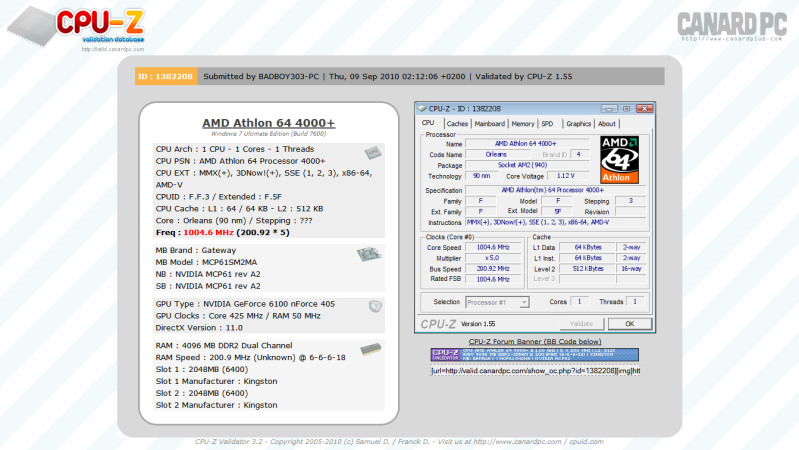
|
|
#60
09-20-2010, 05:31 AM
|
|||
|
|||
|
Trying to install
I can't seem to get the OSX installer to actually boot up, as soon as the apple logo pops up the computer crashes and reboots, I've been trying different bios settings but nothing seems to work, any tips would be awesome.
Running Intel i7 with ASUS P6X58D-E motherboard and an Nvidia 8800, i've tried all sorts of methods to install but nothing seems to work. Emprie EFI, iATKOS, plain darwin with OSX DVD. I got nothing here  💡 Deploy cloud instances seamlessly on DigitalOcean. Free credits ($100) for InfMac readers.
|
 Linear Mode
