 |


|
#231
 10-24-2008, 07:00 AM
|
||||
|
||||
|
if i was you i would use Leo4All v3 in my opinion it is the best AMD install
 iMac ::: Mac OS X 10.6.1 ::: Intel Core2Duo 2.93GHz ::: NVIDIA Geforce GT 120 256MB ::: 4GB DDR3 RAM Milanca Project ::: Mac OS X 10.6.1 Retail ::: Vanilla Kernel ::: Intel Core2Quad Q6600 2.4GHz ::: NVIDIA GeForce 8600 GT 256MB ::: 4GB DDR2 RAM ::: GIGABYTE GA-EP35C-DS3R |


|
#232
10-24-2008, 08:10 PM
|
|||
|
|||
|
Hello all,
I would like to install OS X on my Athlon system. My Hardware is the following: MB: ASRock 939Dual-VSTA Athlon 3000+ Chipset: Northbridge: ULi M1695 Southbridge: ULi M1567 Gfx: GForce 2ti (AGP) DVD and HDD at IDE I tried a Leo4All DVD ( don't know which version), but it hang in the boot screen. Is it possible to install on my hardware and if so, which distri is the best for me. Thanks for now, elinmerl |
|
#233
10-24-2008, 08:21 PM
|
||||
|
||||
|
you need to try the v3 of Leo4All. I've seen this chipset talked about before and thats the distro used. see this thread over at InsanelyMac: http://forum.insanelymac.com/index.p...opic=24047&hl=
They refer to Tiger in the beginning but it has been found to work with Leopard as well. 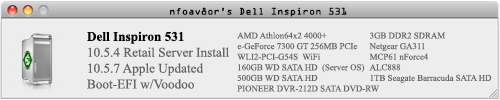 Last edited by nfoav8or; 10-24-2008 at 08:57 PM. |


|
#234
10-26-2008, 05:10 AM
|
|||
|
|||
|
M2N-SLI (nForce 560 SLI) ethernet?
Hi, new Leo4All adopter and I've gotten version 4.1.1 up and mostly running. The only crucial issue is getting ethernet going - it works fine in WinXP 64. Otherwise, 10.5.4 works fine on dual AMD processors.
I have an M2N-SLI motherboard and the manual is frustratingly unclear about the driver I'm looking for. It lists nVidia nForce 560 SLI MCP built-in Gigabit MAC with external PHY. I can't recall how to read the id for the ethernet or I would. I tried all the nForce drivers for ethernet on the DVD to no avail and also the one over at InsanelyMac referenced here but no dice. Actually, the system log mentioned above identifies the card but then bails with the error, "Could not find valid PHY". So I'm guessing, although it is an nForce4 board, this particular LAN thingie is not supported? Thought I'd ask here before posting over there in case this is a common issue. I'll try a fresh install (again - I believe 4.1.1 is the latest for AMD processors?) and then, if that fails, *just* installing *only* the above-linked driver but I have little faith given the above error. Thanks for any hints! |
|
#235
10-26-2008, 07:52 AM
|
||||
|
||||
|
@ blue_brian - you don't need to do fresh installs to get these from the DVD. get a copy of MainMenu and after you place it in the applications folder, run it and from the drop-down menu, select "Finder"->"Show Invisibles" then open your DVD and go to /System/Installation/Packages/ to find the right install packages for you. This is good if you like a certain distro but it doesn't include certain files, because then you can load a different distro and get the files you need.
Hope this helps. P.S. I use PCWiz's "OSx86 Tools Utility" and select "view PCI Device/Vendor ID"... when looking at it, for example, my ethernet is: Code:
Bridge [0680]: nVidia Corporation MCP61 Ethernet [10de:03ef] |
|
#236
10-26-2008, 04:28 PM
|
|||
|
|||
|
Installation Guide for iDeneb 10.5.5 on GA-P35-DS4???
Could someone post the required patches, and a complete step-by-step installation guide for Gigabyte GA-P35-DS4 Motherboard.
The complete configuration would be GA-P35-DS4 Mobo, E7200 C2D, 2GB Transcend RAM, Sony 16x DVD-RW (IDE), 320GB of HDD space free, all for Leopard (I dunno how to partition, so that too please). |
|
#237
10-26-2008, 04:52 PM
|
||||
|
||||
|
Quote:
http://forum.insanelymac.com/index.php?showtopic=86167 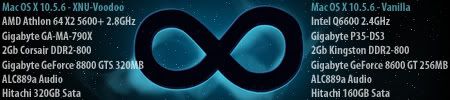
|


|
#238
10-27-2008, 12:10 AM
|
|||
|
|||
|
Quote:
But the OSx86 Utility is cool (I'm behind on the non-terminal ways to get this info). The ethernet controller is listed as an nVidia Corp CK804 Ethernet Controller [10de:0057] (rev f3). So not on the supported list for that driver I linked to. Boo. So ... barring any other ideas, what's the most compatible ethernet PCI 2.2 or PCIe card I can get (all USB ports in use)? Most of what I read here is about on-board ethernet so I thought I'd just ask. |
|
#239
10-27-2008, 04:32 AM
|
|||
|
|||
|
Quote:
|
|
#240
10-28-2008, 03:36 PM
|
|||
|
|||
|
Hallo all!
Quote:
I followed the steps posted here: http://forum.insanelymac.com/index.php?showtopic=130955 And after that it boots up. But after another reboot, I get again "still waiting...".The workaround is to boot every time with -f. Did I something wrong? The next problem is my graphic card. There seems to be no kext in leo4all. So I can only view 1024x768. Is there anywhere a kext this card (see above), so that I can use 1280x1024? I tried to activate german language. Many things are now in german. But not all, e.g. the finder. Is not the complete language installed? And last, I have now 10.5.2. How can I update to 10.5.5? Thanks, elinmerl 💡 Deploy cloud instances seamlessly on DigitalOcean. Free credits ($100) for InfMac readers. Last edited by elinmerl; 10-28-2008 at 03:45 PM. |
 Linear Mode
