 |





|
#51
 01-02-2009, 12:46 AM
|
|||
|
|||
|
Install 10.5.6 on 790FX/SB600 with Phenom 9830
Ok,I burned iPC 10.5.6 to DVD using ImgBurn.The img boots up under -v maxmem=2048 (cuz I have 4GB DDR 800
 ) and after it tells me that fire wire is active,it saing that it is ) and after it tells me that fire wire is active,it saing that it is "Still waiting for root device"... Is there anyway to overcome this?  
|

|
#52
01-02-2009, 01:01 AM
|
||||
|
||||
|
Quote:
Mac OS X Leopard 10.5.8 (9L30) | Chameleon 2.0 RC3 | Intel Pentium 4 3Ghz 800Mhz FSB HyperThread 1MB L2 cache SSE3 1MB L2 cache works, cosmetic display of 512KB L2 cache | Asus P4V8X-MX VIA Chipset, VIA-VT8237 Southbridge | AC97 VIA8237 | Dual 1GB 333Mhz DDR SDRAM | nVidia PNY GeForce 7600GS 512MB 8x AGP DVI/TV-Out/VGA [NVinject 0.2.1; QE/CI/QuartzGL/Rotation] | Darwin Kernel Version 9.7.0: Sun Jun 14 20:48:28 IST 2009; Voodoo 2.0 Intel alpha3 :xnu-1228.12.14/BUILD/obj/RELEASE_I386 i386
|


|
#53
01-02-2009, 01:08 AM
|
|||
|
|||
|
Unhappy Install 10.5.6 on 790FX/SB600 with Phenom 9830
Ok,I burned iPC 10.5.6 to DVD using ImgBurn.The img boots up under -v maxmem=2048 (cuz I have 4GB DDR 800) and after it tells me that fire wire is active,it saing that it is
"Still waiting for root device"... Is there anyway to overcome this? Edit/Delete Message P.S. Ooops,sry I didn't see witch page I'm on... Any idea when this patch will come out  ? ?Last edited by dotzev; 01-02-2009 at 01:12 AM.
|
|
#54
01-02-2009, 01:08 AM
|
|||
|
|||
|
Quote:
Thanks in advance Processor: AMD Phenom X4 9150e QuadCore 1.8GHz boxed | Mainboard: GigaByte GA-MA78GM-S2H (Rev. 1.1) | Memory: 4GB MDT AMD-Edition | Chipset: AMD® 780G + SB700 | Video: Integrated ATi® Radeon HD3200 | LAN: GigabitLAN, Realtek RTL8111C | Audio: ALC889A | Harddisk: Seagate Barracuda® 7200.10 3250410AS 250GB, SATA | DVD: LG Electronics GH22LS30, SATA | WLAN: LONGSHINE LCS 8131N1 | Bluetooth: ANYCOM USB-200 USB Adapter | OS: MacOS X v10.5.6 (Leo4Allv4.1) | Bootloader: Chameleon 1.0.12 | Kernel: Voodoo 9.5.0 Kernel (Rev A) | Case: Foxconn TW080 | PSU: SilverStone Nightjar ST30NF 300W
|

|
#55
01-02-2009, 02:03 AM
|
||||
|
||||
|
All I can say is soon.
Mac OS X Leopard 10.5.8 (9L30) | Chameleon 2.0 RC3 | Intel Pentium 4 3Ghz 800Mhz FSB HyperThread 1MB L2 cache SSE3 1MB L2 cache works, cosmetic display of 512KB L2 cache | Asus P4V8X-MX VIA Chipset, VIA-VT8237 Southbridge | AC97 VIA8237 | Dual 1GB 333Mhz DDR SDRAM | nVidia PNY GeForce 7600GS 512MB 8x AGP DVI/TV-Out/VGA [NVinject 0.2.1; QE/CI/QuartzGL/Rotation] | Darwin Kernel Version 9.7.0: Sun Jun 14 20:48:28 IST 2009; Voodoo 2.0 Intel alpha3 :xnu-1228.12.14/BUILD/obj/RELEASE_I386 i386
|
|
#56
01-02-2009, 03:05 AM
|
|||
|
|||
|
Okay, then I'll wait for burning
Processor: AMD Phenom X4 9150e QuadCore 1.8GHz boxed | Mainboard: GigaByte GA-MA78GM-S2H (Rev. 1.1) | Memory: 4GB MDT AMD-Edition | Chipset: AMD® 780G + SB700 | Video: Integrated ATi® Radeon HD3200 | LAN: GigabitLAN, Realtek RTL8111C | Audio: ALC889A | Harddisk: Seagate Barracuda® 7200.10 3250410AS 250GB, SATA | DVD: LG Electronics GH22LS30, SATA | WLAN: LONGSHINE LCS 8131N1 | Bluetooth: ANYCOM USB-200 USB Adapter | OS: MacOS X v10.5.6 (Leo4Allv4.1) | Bootloader: Chameleon 1.0.12 | Kernel: Voodoo 9.5.0 Kernel (Rev A) | Case: Foxconn TW080 | PSU: SilverStone Nightjar ST30NF 300W
|
|
#57
01-02-2009, 07:20 PM
|
||||
|
||||
|
i just finished downloading the release, patched it and the installed it. It works great on my machine, i even managed to get digital audio working on my adi1988 onboard card.
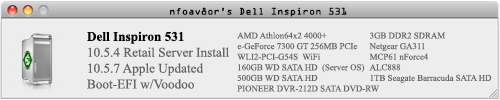
i only had some minor problems: - sometimes a really high pitched sound comes out from the speakers after boot. i goes away when playing video or audio, and it does only seldom return. - last.fm player does not output audio. Amua (which works with itunes) works great. i have no idea why last.fm player is not working. EDIT: last.fm player works now. for some reason after installing the adi1988 driver, the default audio output was set to line out not digital out. funny thing is i tried to install this on my girlfriends machine, which is an pentium d on a 945 gz MB, and intel 950 video, it installed really fast on the sata drive, and then it did not load. i tried booting with -v -f flags, i got the fast scrolling screen when reloading the drivers, and then it just stopped on a black screen. any ideas anyone? thanks. CPU: AMD Athlon 64 X2 5000+ RAM: 2 x 1 Gb 2xSATA HDD ATA DVDRW MB Asus M2N Nvidia MCP61 Video: GeForce 8600 GT 256 Mb RAM ADI 1988 onboard audio Audigy soundcard Realtek lan Last edited by lemn; 01-02-2009 at 09:31 PM.
|


|
#59
01-02-2009, 08:35 PM
|
||||
|
||||
|
i didn't try voodoo kernel, i thought on intel it should work with the vanilla kernel. also, i selected some extra drivers, like marvell gigabit ethernet, intel ich sata and some others. i'll try again, i'll post here if i get it right
 CPU: AMD Athlon 64 X2 5000+ RAM: 2 x 1 Gb 2xSATA HDD ATA DVDRW MB Asus M2N Nvidia MCP61 Video: GeForce 8600 GT 256 Mb RAM ADI 1988 onboard audio Audigy soundcard Realtek lan
|
|
#60
01-02-2009, 08:52 PM
|
|||
|
|||
|
Quote:
💡 Deploy cloud instances seamlessly on DigitalOcean. Free credits ($100) for InfMac readers. * Intel Core i7 920 * ASUS P6T LGA X58 * Mushkin DDR3(3x2GB) 1333 * Nvidia GTX280 * TRUE w/ Scythe "ULTRA KAZE" @ 3000 RPMS and AC MX-2 * Cooler Master Case 690 * Corsair 650TX * 2x Seagate 500GB Sata 32MB Cache(Raid 0)
|
 Linear Mode
